Audio interfaces for bedroom producers: a practical guide
What does an audio interface actually do? Learn about inputs, latency and recording, compare 12 picks by budget, value and performance, with specs and buying links.
A research-based guide using manufacturer documentation and checked US prices, not a hands-on group test. Recommendations reflect our assessment of features, everyday workflow and value. Buying links have no affiliate tracking.
An audio interface is the small box that connects your recording setup to your computer. It gives microphones and instruments a way into your music software, and sends the sound back out to headphones and speakers. For a bedroom producer, its biggest benefit is making those everyday jobs easier.
You do not need an expensive rack of equipment to start. You might not need an interface yet at all. This guide explains what changes when you buy one, how to avoid paying for connections you will never use, and which of 12 interfaces fits the music you want to record. Start with our category winners, or jump to the price band that fits your budget.
The best interfaces by budget and purpose
Already know what an interface does? Jump straight to your budget. Otherwise, the next sections explain the connections and recording basics. These awards are editorial judgements for the stated use, not a claim that one model wins every measurement.
What does an audio interface actually do?
Your computer works with numbers. A microphone or guitar sends an electrical signal. An interface contains the electronics that connect those worlds: a preamp raises a quiet microphone signal, an analogue-to-digital converter turns it into data, and a digital-to-analogue converter turns your computer’s playback back into a signal for listening.
- Inputs let you record microphones, guitars, basses, synths and other sound sources as separate tracks.
- Outputs connect a pair of powered studio monitors and your headphones, usually with convenient volume controls.
- Drivers let your recording software communicate with the hardware. Good compatibility and stable operation matter as much as a headline specification.
- Monitoring controls help you hear what you are recording against music already in the project.
Your DAW is the recording and production application: Ableton Live, Logic, FL Studio or another program. The interface handles audio entering and leaving it. Buying an interface does not automatically improve your arrangement, remove room reflections or make an exported track louder.
Do you need one if you only make beats?
If you build tracks entirely from samples and software instruments, and your existing headphone output works well, you can start without an interface. A USB MIDI keyboard can normally connect straight to the computer. An interface becomes useful when you want to record an XLR microphone, plug in a guitar, connect balanced studio monitors or improve an awkward monitoring setup.
A USB microphone already includes its own conversion hardware, so it does not normally plug into a standard interface. Combining a USB mic with a separate interface is possible in some software setups, but a single interface handling both recording and playback is usually easier to configure.
The connections, without the jargon
Mic, line and instrument are different input jobs
A mic input amplifies the small signal from a microphone. A line input accepts equipment such as a synth or external preamp. An instrument or Hi-Z input is designed for a guitar or bass plugged directly in. A combo socket accepts an XLR or quarter-inch plug, but it still records one channel at a time. Select the correct mode for the source.
Phantom power, usually marked 48V, supplies compatible microphones through an XLR cable. Enable it when the microphone requires it, following its instructions; it is not a gain boost. Lower monitoring levels before connecting equipment or switching power.
Count what you want to record simultaneously
- One vocal: one mic preamp is enough.
- Voice plus direct guitar: one mic input and one instrument input.
- Voice plus a microphone on an acoustic guitar: two mic preamps.
- A stereo synth: two line inputs. Recording a vocal at the same time requires another input.
- A drum kit with several microphones: more mic preamps than these interfaces provide on their own. Models with ADAT can add a compatible external preamp/converter; include that cost.
For a pair of powered studio monitors, use the left and right line outputs with cables that suit the speakers, normally balanced TRS-to-TRS or TRS-to-XLR. Passive speakers still require an amplifier. A headphone socket is a separate listening connection, and two headphone sockets do not necessarily offer two independent mixes.
MIDI, loopback and USB-C
MIDI sends performance instructions such as notes and clock; it does not carry the sound of a synth. Loopback routes computer audio into recording or streaming software without a physical cable. It is useful for tutorials and livestreams, but you must avoid routing the output of a stream back into its own input.
USB-C describes the connector shape. It does not promise Thunderbolt, a particular speed or the power your interface needs. Check the model’s power requirement, included cable and current support for your exact operating system. A charge-only cable will not carry your recordings.
Latency: why you sometimes hear yourself late
Latency is the delay between playing a note and hearing the result. When you monitor through a DAW, the signal has to enter the computer, be processed and come back out. The audio buffer gives the computer time to work: smaller buffers can feel more immediate, while larger ones make a busy project easier to run without crackles.
Two ways to listen while recording
- Direct monitoring: hear the input through the interface, avoiding the trip through your DAW. Useful for vocals and acoustic instruments when you do not need to hear computer effects.
- Software monitoring: hear the signal after your DAW has processed it. Necessary if you want to play through a software guitar amp or hear a virtual instrument responding to MIDI.
Basic direct monitoring does not include your DAW’s reverb or amp simulator. Some premium interfaces add their own processing: Apollo uses compatible UAD DSP plugins through Console, while RME offers monitoring effects through TotalMix FX. These are separate from the DAW plugin chain. If you hear a doubled or hollow sound, check whether direct monitoring and DAW monitoring are both playing the same input. Choose one listening path for that signal.
The sample-rate ceiling is a poor way to choose a first interface. Higher rates increase processing and storage demands; they do not automatically make a better record. Likewise, most native plugins still run on your computer, so a basic USB interface will not rescue a session overloaded with software instruments.
Compare all 12 audio interfaces
Prices were checked on 20 September 2026 in US dollars, before tax and shipping. Price bands reflect those listings rather than permanent retail prices. The comparison counts physical analogue connections; loopback and digital expansion do not add microphone sockets to the box. For a performance purchase, check driver support and return terms for your exact computer.
Scroll the table to see every specification →
| Interface | Best for | Analogue inputs | Line outputs | US price |
|---|---|---|---|---|
| Behringer U-Phoria UMC202HD | Best budget · recording for under $100 | 2 · mic / line / instrument | 2 balanced | $86.90 |
| Audient EVO 4 | Best for beginners · help setting recording levels | 2 mic / line · DI shares input 1 | 2 balanced | $179 |
| Arturia MiniFuse 2 | Best value under $200 with MIDI | 2 · mic / line / instrument | 2 balanced | $199 |
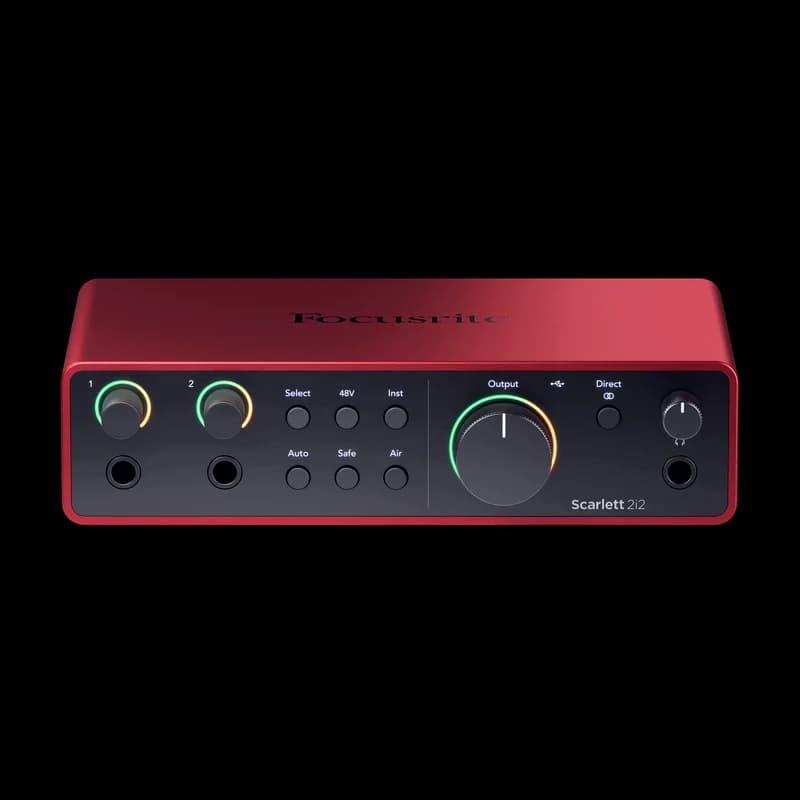
| Focusrite Scarlett 2i2 · 4th Gen | Best overall for a first bedroom recording setup | 2 · mic / line / instrument | 2 balanced | $224.99 |
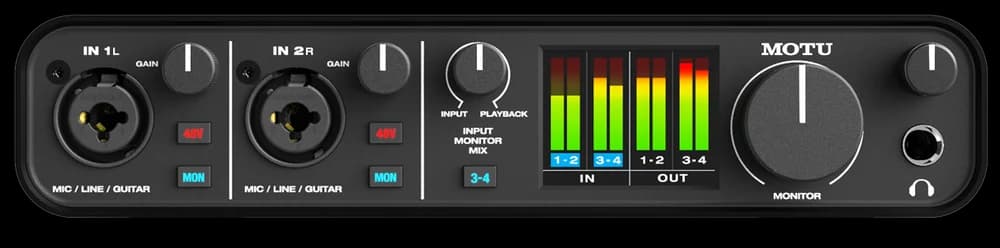
| MOTU M4 | Best for hardware synths under $300 | 2 mic / line / instrument + 2 line | 4 balanced · RCA mirrors | $279.95 |
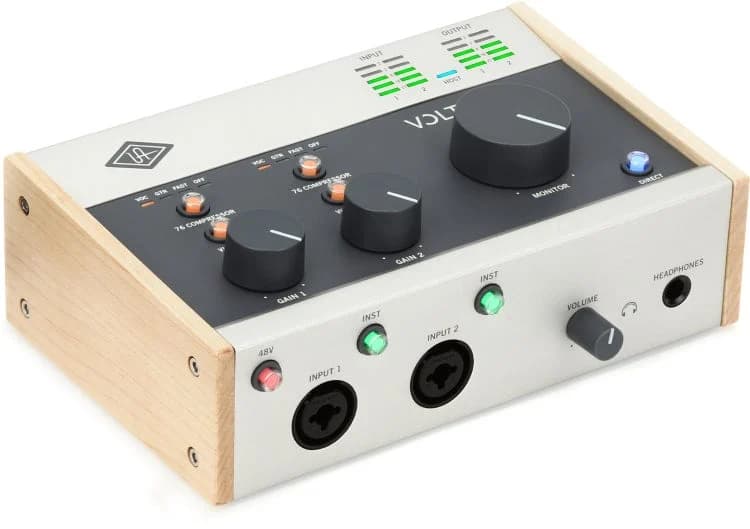
| Universal Audio Volt 276 | Best for recording with analogue colour | 2 · mic / line / instrument | 2 balanced | $299 |
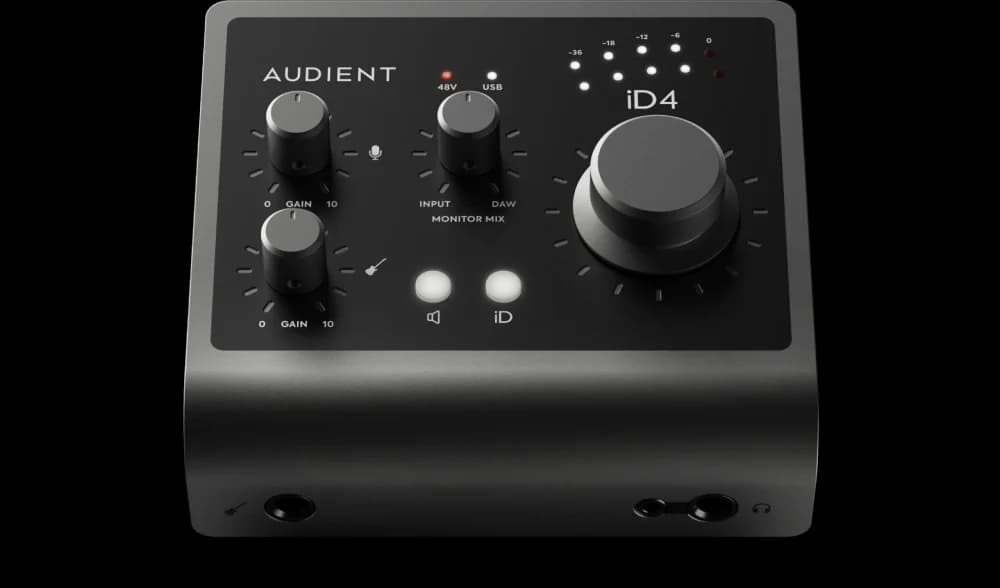
| Audient iD4 MKII | Best for a compact one-mic desktop setup | 1 mic / line + 1 instrument DI | 2 balanced | $299.99 |
| Solid State Logic SSL 2+ MKII | Best for collaboration · two headphone listeners | 2 mic / line · front DIs share channels | 4 balanced | $299.99 |
| Audient iD14 MKII | Best compact option for future mic expansion | 2 mic / line · DI shares input 1 | 4 balanced | $399.99 |
| Focusrite Scarlett 16i16 · 4th Gen | Best studio hub · synths, routing and expansion | 6 · 2 mic / line / instrument + 4 line | 4 balanced | $409.99 |
| RME Babyface Pro FS | Best premium performance workflow | 4 · 2 mic / line + 2 line / instrument | 2 balanced XLR | $849 |
| Universal Audio Apollo Twin X DUO · Gen 2 | Best for UAD processing while recording | 2 mic / line · Hi-Z shares input 1 | 4 balanced · monitor pair + line pair | $999 |
Under $200: affordable first setups
This is enough money to start recording properly. The Behringer keeps the total cost down, EVO adds help with level setting, and MiniFuse adds MIDI connections and a convenient monitoring blend control.
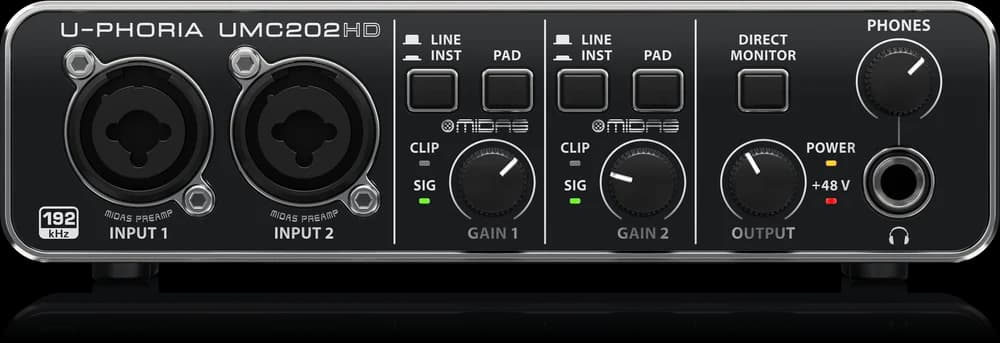
Behringer U-Phoria UMC202HD
- Best for
- Best budget · recording for under $100
- Analogue inputs
- 2 · mic / line / instrument
- Mic preamps
- 2
- Line outputs
- 2 balanced
- Headphones
- 1 output · separate level
- MIDI DIN
- No
- Monitoring
- Direct monitor switch
- Expansion
- No digital expansion
- Price checked
- $86.90
The UMC202HD is the budget pick because it covers the essential recording job for less than $100: two mic preamps, instrument inputs, phantom power and a headphone output. If the alternative is spending your entire budget on an interface and having nothing left for a microphone or stand, this is the more balanced starting point.
The compromises are everyday conveniences: a basic direct-monitor switch, simple level indicators and no MIDI DIN or digital expansion. Check the current driver for your operating system before ordering. This recommendation is specifically for the UMC202HD; similarly named UMC22 and UM2 models are different products.
- Lowest checked price in the guide
- Two microphone inputs
- Leaves budget for the rest of the setup
Basic metering and monitoring controls; no expansion path for more inputs.
Our take: A practical minimum-cost recording tool when the whole studio budget matters.
Audient EVO 4
- Best for
- Best for beginners · help setting recording levels
- Analogue inputs
- 2 mic / line · DI shares input 1
- Mic preamps
- 2
- Line outputs
- 2 balanced
- Headphones
- 1 output · auto-mutes speakers
- MIDI DIN
- No
- Monitoring
- Monitor mix · loopback
- Gain assistance
- Smartgain
- Price checked
- $179
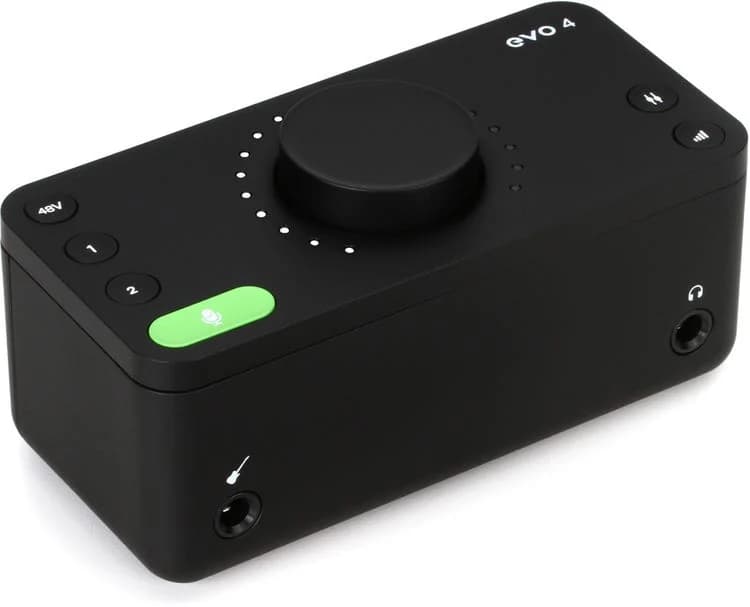
EVO 4 is for the producer who wants a small box and fewer setup decisions. Smartgain listens to your performance and sets a starting recording level, while loopback supports recording computer audio. Its instrument input uses one of the two recording channels; it is not a third input.
The compact design uses a shared main control for multiple jobs, rather than a dedicated knob for everything. Connecting headphones automatically mutes the monitor outputs. That is handy for switching from speakers to a vocal take, but less suitable if you need both playing independently. Spend the extra over the Behringer for these workflow features, not an assumed transformation in sound.
- Automatic starting gain
- Small desk footprint
- Loopback for tutorials and streaming
Shared controls and automatic speaker muting are less flexible than a larger desktop interface.
Our take: Our beginner pick for solo sessions where easy setup is the priority.
Arturia MiniFuse 2
- Best for
- Best value under $200 with MIDI
- Analogue inputs
- 2 · mic / line / instrument
- Mic preamps
- 2
- Line outputs
- 2 balanced
- Headphones
- 1 output · separate level
- MIDI DIN
- In + out
- Monitoring
- Input / USB blend · loopback
- USB hub
- 1 USB-A port · 250 mA maximum
- Price checked
- $199
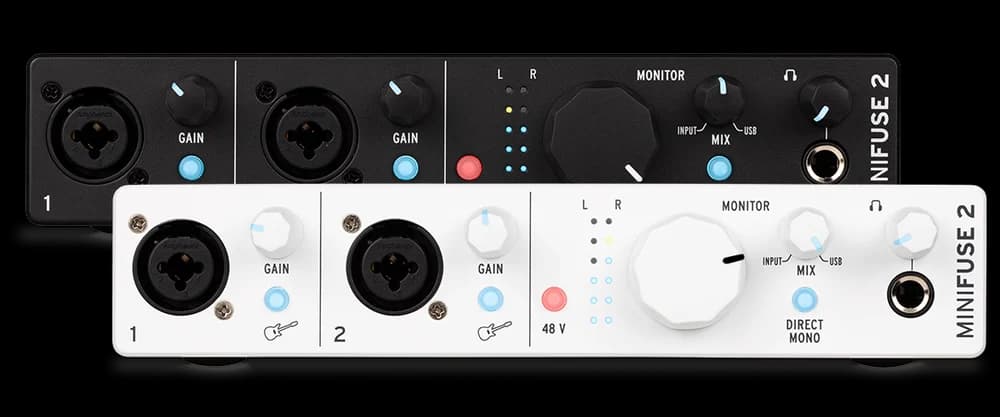
The MiniFuse 2 combines two flexible inputs with five-pin MIDI in and out. That makes it appealing if a hardware synth or drum machine is part of your plans. MIDI carries notes and timing, while the instrument’s audio still needs a line input. The physical input/USB blend knob also makes it easy to hear your performance against a backing track.
Its USB-A hub can tidy a small controller setup, but the 250 mA limit means it is not a replacement for a powered hub. This recommendation is for the standard MiniFuse 2, not the separate OTG model. The linked black version was listed as arriving soon when checked; confirm stock and the final price before ordering.
- Two mic inputs below $200
- Five-pin MIDI for hardware instruments
- Direct-monitor blend control
Only two analogue inputs and two line outputs; the USB hub has a modest power allowance.
Our take: Strong value when you want a small recording setup with MIDI and straightforward physical controls.
$200–$349: the everyday studio sweet spot
Choose the workflow here, not just the brand. Scarlett helps with gain, MOTU adds physical inputs, Volt adds analogue processing, Audient offers a compact one-mic desktop layout, and SSL makes recording with another person easier.
Focusrite Scarlett 2i2 · 4th Gen
- Best for
- Best overall for a first bedroom recording setup
- Analogue inputs
- 2 · mic / line / instrument
- Mic preamps
- 2 · 69 dB gain range
- Line outputs
- 2 balanced
- Headphones
- 1 output · separate level
- MIDI DIN
- No
- Monitoring
- Direct monitor · loopback
- Power
- USB · 900 mA
- Price checked
- $224.99
The 2i2 is our first shortlist for a singer, guitarist or producer recording one or two sources at a time. Both channels accept microphones, line-level equipment or instruments, so a second mic is an option rather than a reason to replace the interface. Its rear XLR sockets and front jack sockets still share two recording channels; they are not four independent inputs.
Auto Gain helps establish an input level and Clip Safe can reduce gain when a performance gets louder. Those are useful conveniences when you are also the performer, although neither replaces checking your loudest passage. At the checked price it is a small step above the MiniFuse 2, so choose between recording assistance and MIDI connectivity rather than assuming the more expensive box is better at everything.
- Two microphone channels
- Auto Gain and Clip Safe for solo sessions
- Independent headphone volume
No five-pin MIDI or extra line inputs. A stereo synth uses both recording channels.
Our take: A sensible first recording interface when two inputs are enough and easy level setting matters.
MOTU M4
- Best for
- Best for hardware synths under $300
- Analogue inputs
- 2 mic / line / instrument + 2 line
- Mic preamps
- 2
- Line outputs
- 4 balanced · RCA mirrors
- Headphones
- 1 output · separate level
- MIDI DIN
- In + out
- Monitoring
- Input / playback blend · loopback
- Metering
- Colour LCD · inputs and outputs
- Price checked
- $279.95
The M4’s extra rear line inputs are its practical advantage. Leave a stereo synth connected to inputs 3–4 while using the two front inputs for a microphone and guitar. Its display also gives you a clearer view of levels than a single clipping light. Four outputs provide routing options beyond one pair of speakers, although the RCA sockets mirror the corresponding jack outputs rather than adding more channels.
At $279.95, the step up from the 2i2 buys additional connections you can actually use. It is not a four-microphone interface: only the front two channels have mic preamps. There is also no ADAT input, so a future multi-mic drum setup would need a different expansion plan.
- Four simultaneous analogue inputs
- Visible input and output meters
- MIDI and additional line outputs
Only two mic preamps and one headphone output. More sockets do not mean independent headphone mixes.
Our take: The most useful upgrade here if a stereo hardware instrument is already part of your room.
Universal Audio Volt 276
- Best for
- Best for recording with analogue colour
- Analogue inputs
- 2 · mic / line / instrument
- Mic preamps
- 2 · optional Vintage mode
- Line outputs
- 2 balanced
- Headphones
- 1 output · separate level
- MIDI DIN
- In + out
- Monitoring
- Direct monitoring
- Processing
- Analogue 76 compressor presets
- Price checked
- $299
Volt 276 adds a different reason to spend: Vintage preamp mode and an analogue compressor with preset settings. These let you commit a more shaped vocal or instrument sound while recording, in a desktop unit with physical controls and MIDI connections.
That processing is recorded into the take when enabled; you cannot later recover an untouched performance by bypassing a DAW plugin. If you prefer deciding on compression during mixing, leave it off or choose an interface whose extra money buys connections. Volt is not an Apollo: it does not run UAD DSP plugins in the interface.
- Optional analogue compression on the way in
- Vintage input character
- Physical controls and MIDI DIN
Only two inputs, and printed compression cannot be undone after recording.
Our take: Choose it because you want to commit a sound during tracking, not for more I/O.
Audient iD4 MKII
- Best for
- Best for a compact one-mic desktop setup
- Analogue inputs
- 1 mic / line + 1 instrument DI
- Mic preamps
- 1 · 58 dB gain range
- Line outputs
- 2 balanced
- Headphones
- 6.35 mm + 3.5 mm · shared mix
- MIDI DIN
- No
- Monitoring
- Input / DAW blend · loopback
- Power
- USB · USB 3.0 port minimum
- Price checked
- $299.99
The iD4 MKII makes sense when you prefer a small metal desktop unit with a large volume knob and you record one microphone at a time. You can also record its instrument DI alongside the microphone. The two headphone socket sizes are convenient, but they share a listening mix; they do not give a singer and producer independent cue mixes.
At $299.99 it costs as much as some two-preamp options here, despite having only one mic preamp. That makes it a deliberate choice for layout and monitoring, rather than our default value pick. Audient specifies a USB 3.0 port minimum for power, with higher headphone output available from a suitable USB-C supply. Check your laptop or hub before buying.
- Large desktop monitor control
- Mic and instrument recording together
- Both common headphone socket sizes
Cannot record two XLR mics or a conventional pair of stereo line inputs. No MIDI DIN or ADAT expansion.
Our take: Choose it for a focused solo workflow; choose a different model if a second mic or stereo synth is likely.
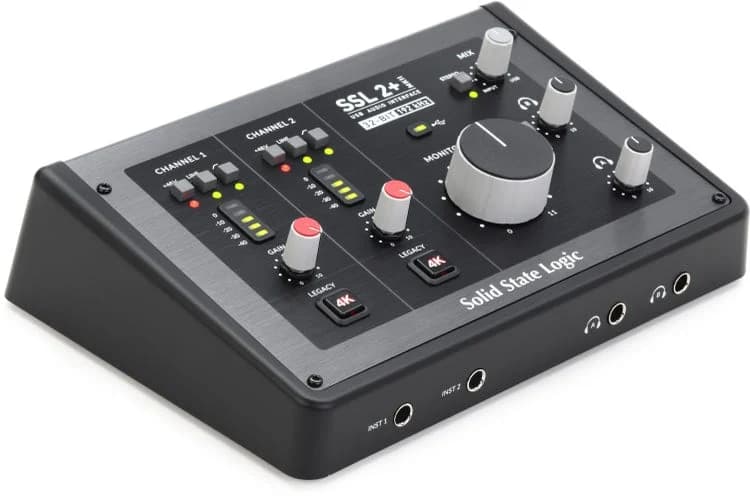
Solid State Logic SSL 2+ MKII
- Best for
- Best for collaboration · two headphone listeners
- Analogue inputs
- 2 mic / line · front DIs share channels
- Mic preamps
- 2 · 64 dB gain range
- Line outputs
- 4 balanced
- Headphones
- 2 · independent levels / mix selection
- MIDI DIN
- In + out
- Monitoring
- Direct monitor blend · loopback
- Input options
- High-pass filters · Legacy 4K
- Price checked
- $299.99
The SSL 2+ MKII is particularly appealing when someone else is recording with you. Two headphone outputs with independent controls and separate mix options are a meaningful upgrade over sharing one socket. Four balanced line outputs also leave room for additional routing.
Its high-pass filters and optional Legacy 4K coloration add useful recording choices, but it still has only two simultaneous analogue inputs. The front instrument sockets share those channels. Compared with the similarly priced M4, choose SSL for the headphone workflow and MOTU for the extra line inputs. This is the updated MKII plus model, not the original SSL 2+ or the simpler SSL 2 MKII.
- Two independently controlled headphone outputs
- Four balanced line outputs
- MIDI and loopback
Two recording channels and no ADAT input; collaboration features do not add microphone inputs.
Our take: A strong choice for a producer and vocalist working together at one desk.
$350–$699: room for a growing studio
Both picks can grow via ADAT. Choose iD14 for a compact desk setup; choose the 16i16 for more instruments connected today, independent listening mixes and broader digital routing. An ADAT expander costs extra, and its channel capacity falls at higher sample rates.
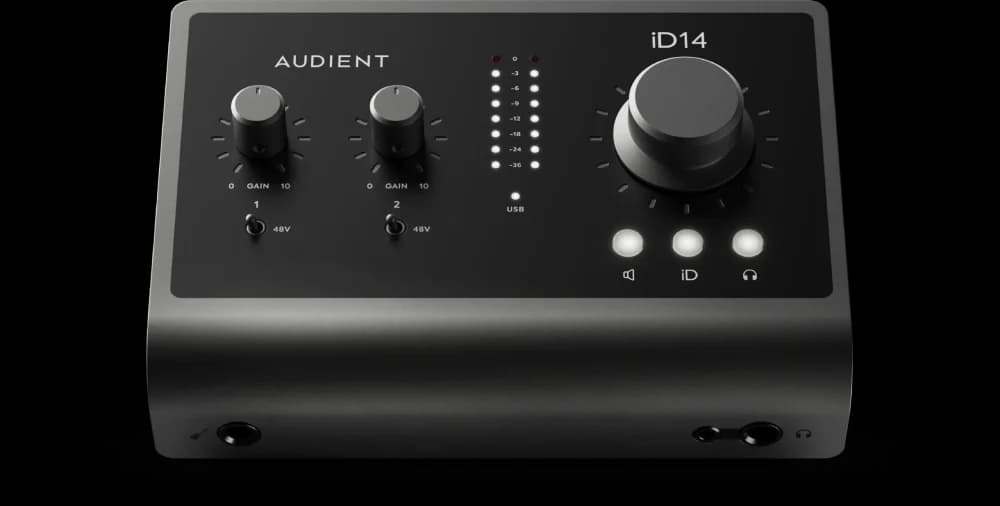
Audient iD14 MKII
- Best for
- Best compact option for future mic expansion
- Analogue inputs
- 2 mic / line · DI shares input 1
- Mic preamps
- 2
- Line outputs
- 4 balanced
- Headphones
- 6.35 mm + 3.5 mm · shared mix
- MIDI DIN
- No
- Expansion
- ADAT input · up to 8 additional channels
- Power
- USB · USB 3.0 port minimum
- Price checked
- $399.99
The iD14 MKII keeps the large desktop monitor control of the iD4 while adding a second mic preamp, more line outputs and an optical ADAT input. It is a better long-term fit if you might later record several microphones but do not want a larger interface on your desk today.
ADAT is an expansion connection, not eight extra microphone sockets in the box. Reaching ten inputs requires an external compatible preamp/converter, sold separately, and the full eight-channel ADAT capacity applies at 44.1 or 48 kHz. The two headphone socket sizes share a mix. Budget for the expander before treating this as a complete multi-mic setup.
- Two mic preamps in a compact chassis
- ADAT input for later expansion
- Four line outputs
No MIDI DIN; expansion costs extra and headphone sockets do not provide independent cue mixes.
Our take: The compact growth option when more microphones are a credible future need.
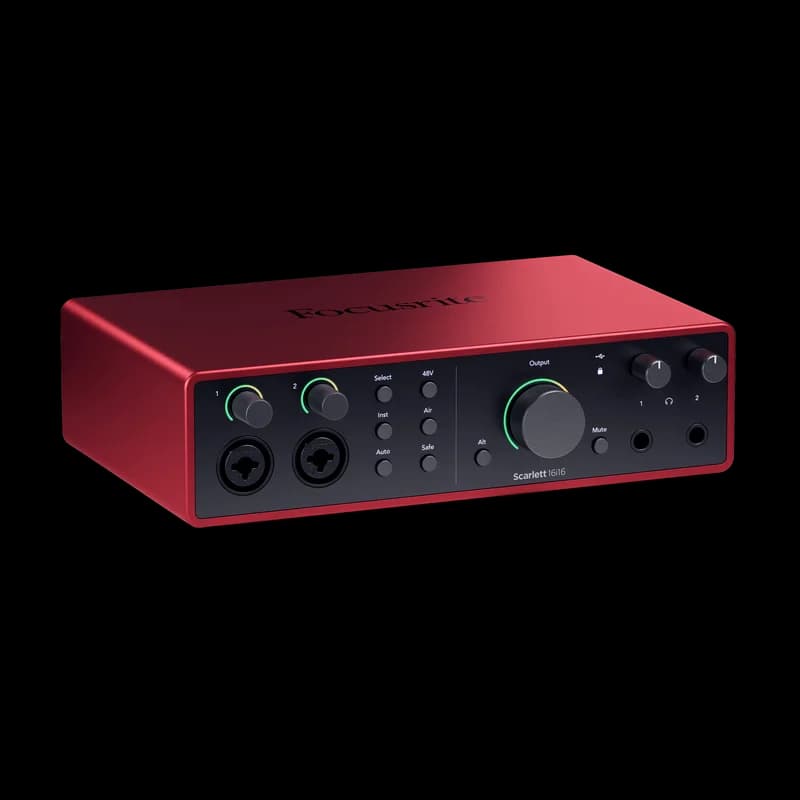
Focusrite Scarlett 16i16 · 4th Gen
- Best for
- Best studio hub · synths, routing and expansion
- Analogue inputs
- 6 · 2 mic / line / instrument + 4 line
- Mic preamps
- 2 · Auto Gain / Clip Safe
- Line outputs
- 4 balanced
- Headphones
- 2 · separate mixes available
- MIDI DIN
- In + out
- Expansion
- ADAT + S/PDIF in / out
- Power
- USB-C 3 A or included power supply
- Price checked
- $409.99
The 16i16 earns its space when a bedroom is becoming a permanent studio. Six analogue inputs can keep several instruments connected, and two headphone outputs, MIDI, ADAT and S/PDIF offer much more routing flexibility than a basic two-channel interface. At the checked price, it costs only $10 more than the iD14 MKII.
The name includes digital channels: there are two mic preamps, not sixteen. You need external digital equipment to use its full advertised channel count, and digital channel availability depends on sample rate. It also needs more power than a typical small interface; use the supplied adapter unless your USB-C source meets Focusrite’s requirement.
- Six physical analogue inputs
- Two headphone outputs and flexible routing
- Digital inputs and outputs for expansion
Larger setup and greater power needs; only two microphones connect directly.
Our take: Our choice for keeping multiple synths connected and building a more flexible studio.
$700 and up: performance and specialist workflows
At this level you should be buying a specific capability. RME is our premium pick for driver control and monitor routing; Apollo is our pick for recording with compatible UAD processing. Neither is essential for making release-ready music in a bedroom.
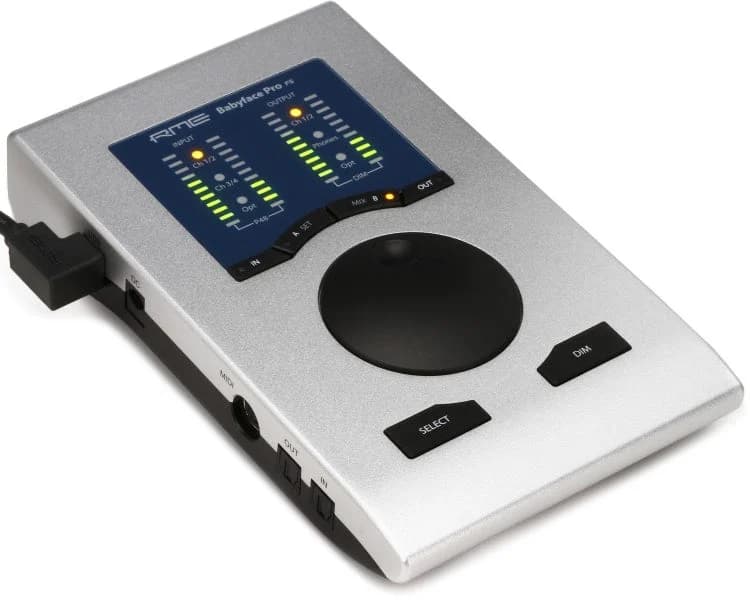
RME Babyface Pro FS
- Best for
- Best premium performance workflow
- Analogue inputs
- 4 · 2 mic / line + 2 line / instrument
- Mic preamps
- 2
- Line outputs
- 2 balanced XLR
- Headphones
- 6.35 mm + 3.5 mm · shared stereo channels
- MIDI DIN
- Via included breakout cable
- Expansion
- Optical ADAT / S/PDIF in / out
- Monitoring
- TotalMix FX · independent output submixes
- Price checked
- $849
Our premium performance pick is about control of a demanding session: RME’s driver ecosystem, TotalMix FX routing and a compact interface with four analogue inputs and optical expansion. TotalMix lets you build monitor submixes without sending every signal through the DAW. This is useful when recording and managing different listening paths becomes part of your daily work.
This is not a measured claim that it has the lowest latency on every computer. Buffer stability still depends on the system and project. Its two headphone socket sizes share a stereo channel pair, and TotalMix takes more learning than a direct-monitor button. Pay for that routing flexibility when you will use it; it is excessive for simply connecting one microphone.
- Flexible hardware monitoring and routing
- Four analogue inputs plus optical expansion
- Compact construction and dedicated driver software
High price and a more involved mixer; the headphone sockets are not two independent cue outputs.
Our take: A premium choice for producers who value routing and driver control over a simple front panel.
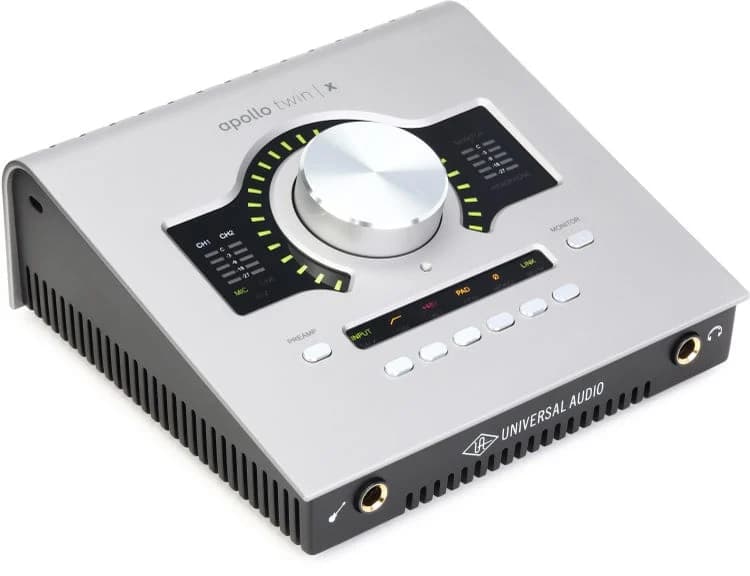
Universal Audio Apollo Twin X DUO · Gen 2
- Best for
- Best for UAD processing while recording
- Analogue inputs
- 2 mic / line · Hi-Z shares input 1
- Mic preamps
- 2 · Unison
- Line outputs
- 4 balanced · monitor pair + line pair
- Headphones
- 1 stereo output
- MIDI DIN
- No
- Expansion
- Optical ADAT / S/PDIF input
- Connection
- Thunderbolt 3 · external power
- Price checked
- $999
Apollo Twin X is the specialist choice for recording through compatible UAD processing in Console. Its onboard DUO DSP and Unison preamps support a different tracking workflow from the native plugins running in your DAW. The quoted price is for the Gen 2 DUO Essentials+ listing; QUAD versions and larger software bundles cost differently.
Check Universal Audio’s exact computer and operating-system requirements before buying: a USB-C-shaped socket alone is not enough for this Thunderbolt model. Budget for a compatible Thunderbolt cable if needed. DUO DSP capacity is finite and extra plugins may cost more. Console monitoring does not make every plugin in your DAW latency-free, and not every native UAD plugin runs on Apollo DSP.
- Compatible UAD processing during tracking
- Unison recording workflow
- Optical input expansion
Thunderbolt compatibility, finite DSP capacity and software costs need consideration; only two analogue input channels.
Our take: Buy it for the UAD recording workflow, not because a bedroom studio needs a $999 interface.
Set it up for your first recording
- Install the manufacturer’s current driver and control application for your supported operating system. On Windows, select its ASIO driver in your DAW when available; on macOS, select the interface through Core Audio.
- Connect the interface to an appropriate USB port and choose it as both the input and output device in the DAW.
- Plug wired headphones into the interface and turn the level down before listening. Bluetooth adds a separate delay and is a poor choice for tracking.
- Connect your microphone or instrument, choose the matching input mode, and enable 48V only if the connected microphone needs it.
- Create a mono track for one mic or guitar, select the actual input and arm it. Use a stereo track with the correct input pair for a stereo synth.
- Perform the loudest section and set gain with room to spare. Peaks roughly between −12 and −6 dBFS are a useful starting target, not a rule to chase. Avoid clipping on the interface and in the DAW.
- Choose direct or software monitoring, record a short take and listen back before committing to a whole performance.
Leave money for the unglamorous parts: an XLR lead, a stable mic stand, a pop filter if needed, monitor cables and a headphone adapter. A recording bundle is only good value if you would actually choose the microphone and headphones in it.
Our buying advice
On the tightest budget, the UMC202HD gets two microphones into your computer. EVO 4 adds level-setting help, while MiniFuse 2 adds MIDI. The Scarlett 2i2 remains our overall starting point for a first recording setup. Choose M4 for a stereo synth alongside other sources, SSL 2+ MKII for two headphone listeners, and Volt 276 for committing analogue colour while tracking.
For expansion, compare iD14 MKII with Scarlett 16i16 and include the cost of any external preamps. Step up to RME when routing and driver control solve a daily problem, or Apollo when its UAD tracking workflow is specifically what you want. You do not need a premium interface to finish a strong record.
Before paying, check driver support, the return policy and total setup cost. If buying used, check every input and output and confirm whether bundled software can transfer. If your current setup already records reliably, buy another interface when you reach a real limitation: not simply because a specification is larger.
Common questions
Will an audio interface make my exported tracks sound better?
It can improve the practicality and quality of analogue recording and monitoring. A normal offline export of the same entirely digital project does not pass through the interface’s converters, so changing the interface alone does not improve that file. External hardware processing is a different workflow.
Does a USB MIDI keyboard need an audio interface?
Usually no. Connect the controller to your computer over USB. Your software instrument generates the audio, which plays through whichever audio device you have selected. A hardware synth’s analogue sound outputs are a separate connection.
Can I use an interface without speakers?
Yes. Plug wired headphones into its headphone output. You can add powered studio monitors later. Check the headphone socket size and whether the output has enough headroom for your particular headphones.
Are two inputs enough for a bedroom producer?
Often, if you record one or two sources at a time. They are not enough for a stereo synth plus a separate vocal simultaneously. Count microphone preamps as well as total inputs: the iD4 MKII has two input channels but only one mic preamp.
Do I need a separate mixer?
Not for a typical one-person recording setup. You can record separate tracks through the interface and mix them in your DAW. A mixer becomes useful for other routing or live-performance needs; check whether any USB mixer records separate channels or only a stereo mix.
Should I buy a more expensive interface or better headphones first?
Identify the bottleneck. If your existing interface is reliable and has the inputs you need, better-fitting headphones or improvements to your monitoring environment may be more useful. If you cannot connect a microphone or record the sources you need together, solve that limitation first.
Sources & further reading
Original specifications, manuals and price listings used in this guide.
- Behringer U-Phoria UMC202HD manufacturer information
- Behringer U-Phoria UMC202HD US price
- Audient EVO 4 manufacturer information
- Audient: EVO 4 speaker muting
- Audient EVO 4 US price
- Universal Audio Volt 276 manufacturer information
- Universal Audio Volt 276 US price
- Solid State Logic SSL 2+ MKII manufacturer information
- Solid State Logic SSL 2+ MKII US price
- Audient iD14 MKII manufacturer information
- Audient iD14 features
- Audient iD14 MKII US price
- Focusrite Scarlett 16i16 · 4th Gen manufacturer information
- RME Babyface Pro FS manufacturer information
- RME Babyface Pro FS US price
- Universal Audio Apollo Twin X DUO · Gen 2 manufacturer information
- Universal Audio Apollo Twin X DUO · Gen 2 US price
- Focusrite Scarlett 2i2 specifications
- Arturia MiniFuse 2 features
- Audient iD4 MKII features
- Audient iD4 technical specifications
- MOTU M4 features
- MOTU M Series user guide
- Ableton: setting up an audio interface
- Ableton: how to reduce latency
- Focusrite: direct monitoring explained
- Focusrite: drivers, conversion and latency
- MiniFuse 2 US price
- iD4 MKII US price
- MOTU M4 US price