Fletcher Audio · Hybrid reverb
Afterspace
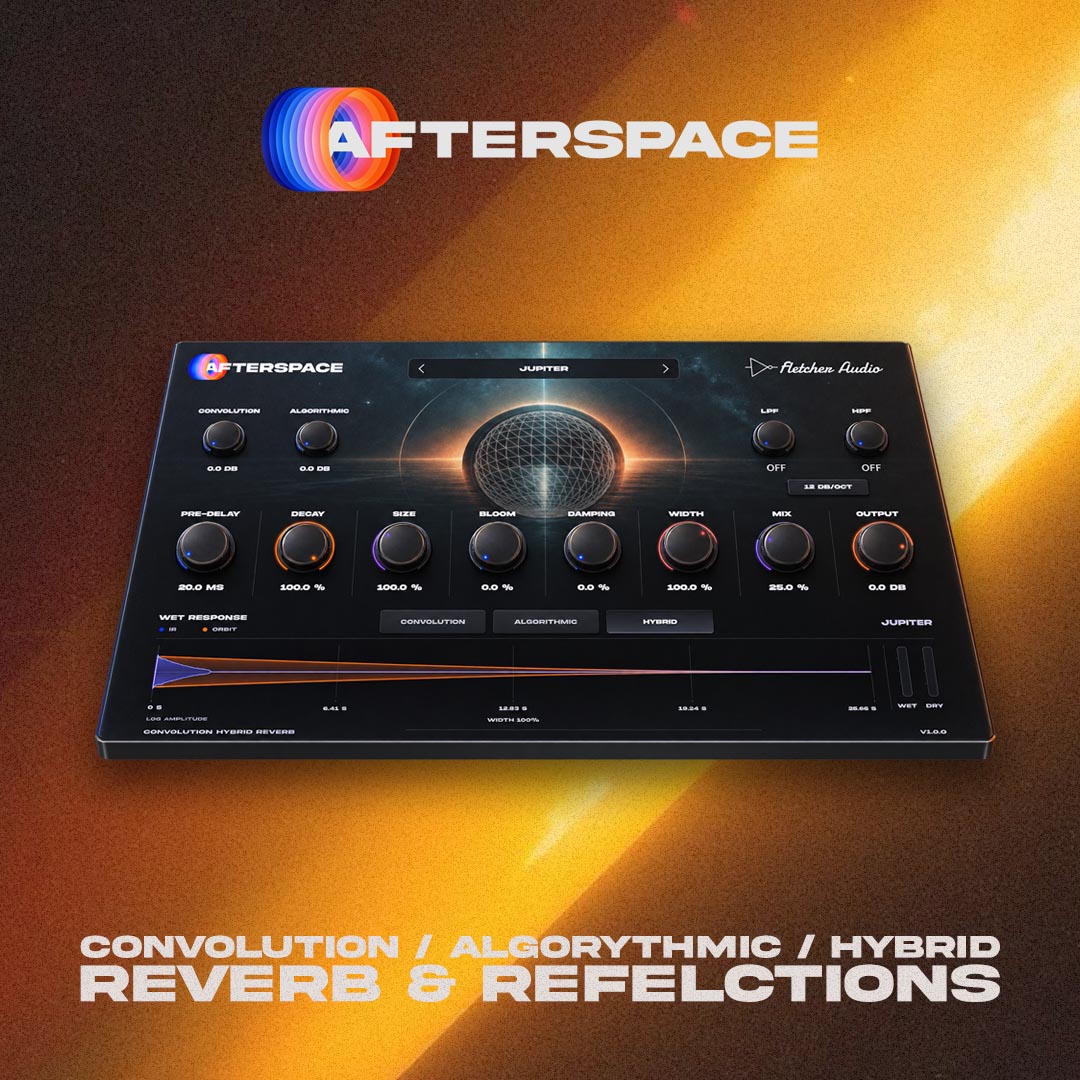
Real spaces meet expansive, evolving tails. Shape convolution and the Orbit algorithm together, or explore either engine on its own.
Documentation
A real space. An evolving tail.
- Pre-delay
- Leave space between the original sound and the start of the reverb.
- Decay
- Shorten the captured response or open up a long Orbit tail, with smooth changes between settings.
- Size
- Spread reflections into larger spaces while preserving the impulse response’s pitch and high-frequency character.
- Bloom
- Let the reverb build around a sound with a softer, evolving onset.
- Damping
- Make high frequencies decay faster as you turn it up. At zero, no additional high-frequency damping is applied.
- Width
- Shape the stereo spread, from a focused image to a broad ambience.
- Mix / Output
- Balance the original and reverberant signals, then set the final level. Use a fully wet mix on an auxiliary return.
- Engine / Space
- Choose Convolution, Algorithmic or Hybrid, then explore 14 planet- and moon-named spaces.
- Convolution / Algorithmic gain
- Raise either wet engine from unity to +12 dB. Hybrid gives you both controls; a single-engine mode shows its own gain.
- Wet HPF / LPF
- Remove low-end weight or soften the top of the wet signal, with a shared 12, 24 or 48 dB/octave slope. The dry signal stays unchanged.
See the space you are shaping
Compatibility
System requirements
- macOS
- macOS 11 or later · Apple Silicon & IntelAudio Unit + VST3
- Windows
- Windows 10 / 11 · x64VST3 · 64-bit
AAX / Pro Tools, VST2, 32-bit and Linux builds are not included.
Choose your DAW format
| DAW | macOS | Windows |
|---|---|---|
| Logic Pro | AU | Not available |
| Ableton Live | AU / VST3 | VST3 |
| FL Studio | AU / VST3 | VST3 |
Use VST3 and the same plugin version when moving a project between Mac and Windows.
Build and validation notes
Mac packages are Developer ID signed and Apple notarized. The universal build contains Apple Silicon and Intel code; Intel hardware testing is pending. Windows VST3 and installer validation run on Windows x64. The Windows installer is not code-signed and may show a Windows reputation prompt. Not every DAW version has been tested; your host may require a newer operating system.
Installation & updates
macOS · Logic Pro, Ableton Live & FL Studio
- Save your project and close your DAW.
- Open the downloaded DMG, launch Afterspace Setup and choose Audio Unit and/or VST3. Logic Pro needs Audio Unit.
- Install, then reopen your DAW. If needed, rescan through Logic’s Plug-in Manager, Live’s Plug-ins settings, or FL Studio’s Manage plugins window.
Manual ZIP: copy Afterspace.component into ~/Library/Audio/Plug-Ins/Components/ and Afterspace.vst3 into ~/Library/Audio/Plug-Ins/VST3/. Copy each complete bundle.
Windows · Ableton Live & FL Studio
- Close your DAW, run Afterspace Setup and approve the administrator prompt.
- Reopen your DAW, enable the VST3 system folder and rescan.
- Insert Afterspace on an audio track or reverb return.
Manual ZIP: copy the complete Afterspace.vst3 bundle into C:\Program Files\Common Files\VST3\. Use the Windows build; Mac bundles cannot run on Windows.
Update or uninstall
The plugin checks for updates when its interface opens, at most once a day. Click the footer version number to check manually or disable automatic checks. Downloads remain in your AudioNode account.
Close your DAW before running a newer installer. It replaces the existing Afterspace version; the Mac installer backs up the previous plugin. To uninstall on Mac, run Uninstall Afterspace in your Applications/Fletcher Audio folder. On Windows, use Settings → Apps → Afterspace → Uninstall. Your projects and presets are preserved, but projects using a removed plugin will report it missing.
Activate Afterspace
Open My plugins in the account you used to buy or claim the plugin. Copy your personal activation key or download its licence file.
Open Afterspace in your DAW, paste the key or choose Import licence file, then activate online. Each licence allows three computers and up to 30 days offline after a successful activation or renewal. Reconnect before the offline period ends.
If you installed an earlier 1.0.0 download, download this licensed edition from your account and run its installer. It also reports version 1.0.0, so the automatic update check will not announce this replacement.
You can download your key file again and deactivate an old computer from your account. Your installer includes the user guide and licence terms; your personal key is provided separately.
What is included?
Afterspace 1.0.0, 14 factory impulse responses, the Orbit algorithmic engine, Mac AU/VST3 and Windows x64 VST3 installers, and manual ZIP downloads. This is an effect plugin for a compatible DAW. Impulse-response attribution is included with each package.